A room-by-room record of everything you own
Itemized Home is an offline home inventory app for storm season and insurance claims. Photograph your rooms, save the receipts and serial numbers, and when you need to file, hand your adjuster a PDF that lists every item and what it was worth.
 For iPhone and iPad
From the first photo to the Proof of Loss
Burst capture, the inventory by room, receipts and serials, what it all adds up to, and a draft Proof of Loss, in the order you meet them.
What the film shows, in order:
- Photos of things around a home drift in the dark. A room-by-room record of everything you own.
- Capture. Capture a whole room in minutes. Burst capture turns several photos into draft items in one pass. The camera snaps a chair, a floor lamp, and a pair of candlesticks, and the three photos lift out of the phone.
- Inventory. Every room, every item. One record for every property you own, organized the way you actually live in it. The three photos land in the Living Room list as new items.
- Details. Photos, receipts, and serials. Add price, serial number, purchase details, and notes. The living room TV opens to its receipt, with its serial number below.
- Home. What it’s worth, room by room. The home screen totals every item’s current value and splits it across your rooms. $21,876 total value, 31 items.
- Claims. Proof of Loss, from your inventory. Pick the damaged items, and it drafts a sworn statement in the Florida format for you to review. A roof leak claim becomes a filled-in Proof of Loss PDF.
- Itemized Home. Every room, on the record. Free on iPhone and iPad. No account, and it works offline.
Everything you need to document a home
Catalog your home
One record for every property you own, organized the way you actually live in it.
- Manage multiple properties: home, vacation house, rental
- Default rooms for every property, plus your own custom rooms
- Add price, serial number, purchase details, and notes
- Attach photos, videos, receipts, and manuals
- Color-coded tags and custom fields when you need more structure
Capture fast
Most home inventories never get finished because photographing everything one item at a time takes days. These tools cut it down to an afternoon.
- Snap or pick a photo straight into an item
- Burst capture turns several photos into draft items in one pass
- Document scanner for receipts and manuals
- Import a batch of photos from your library
Reports and Proof of Loss
Turn the inventory you already built into the paperwork an insurer asks for.
- Export as CSV, Excel, or PDF with photos included
- Generate a Proof of Loss from the items you lost
- Per-property insurance card pre-fills your claims
- Share through the standard iOS share sheet
Built for real life
You can still open it when the power is out and the cell towers are down.
- Fully offline. Your inventory lives on your phone.
- No account to create and no password to forget
- Light, dark, and system themes
- Search and filter by room or tag
- In-app support chat when you need a hand

Your Proof of Loss, built from what you already catalogued
After a fire or a hurricane, your insurer asks for a sworn statement listing what you lost and what it was worth. Most people end up writing that from memory, weeks later, while they are dealing with everything else at the same time. If you have an inventory, the app fills it in for you.
- Pick what you lostSelect the damaged items straight from your existing inventory.
- Add the damage detailNote what happened to each item and adjust the claimed amount if you need to.
- Generate the documentYour insurance card fills in the policy details, and the PDF is ready to send.
One caveat: The Proof of Loss template follows the Florida sworn statement format. It is a draft you prepare and review yourself, not legal advice, and requirements vary by state and by insurer. Check with your adjuster or attorney before you file.
A look inside
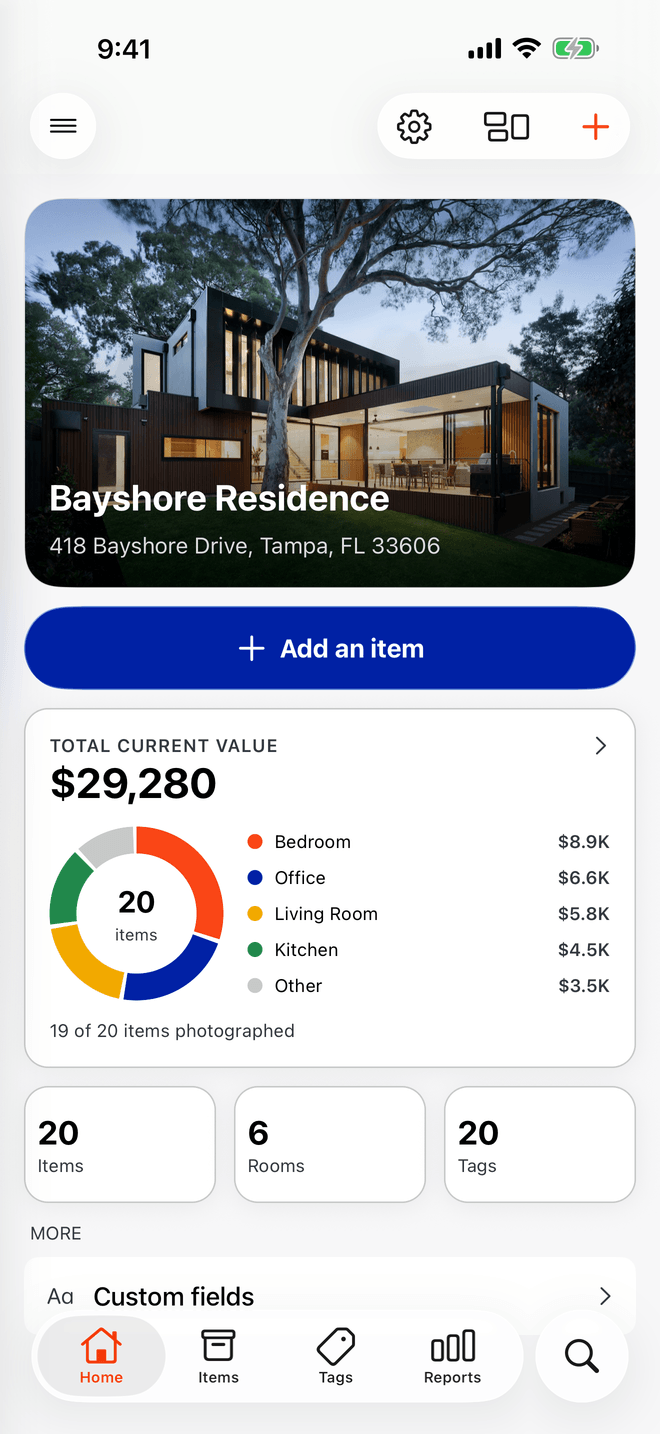
See everything you own, room by room
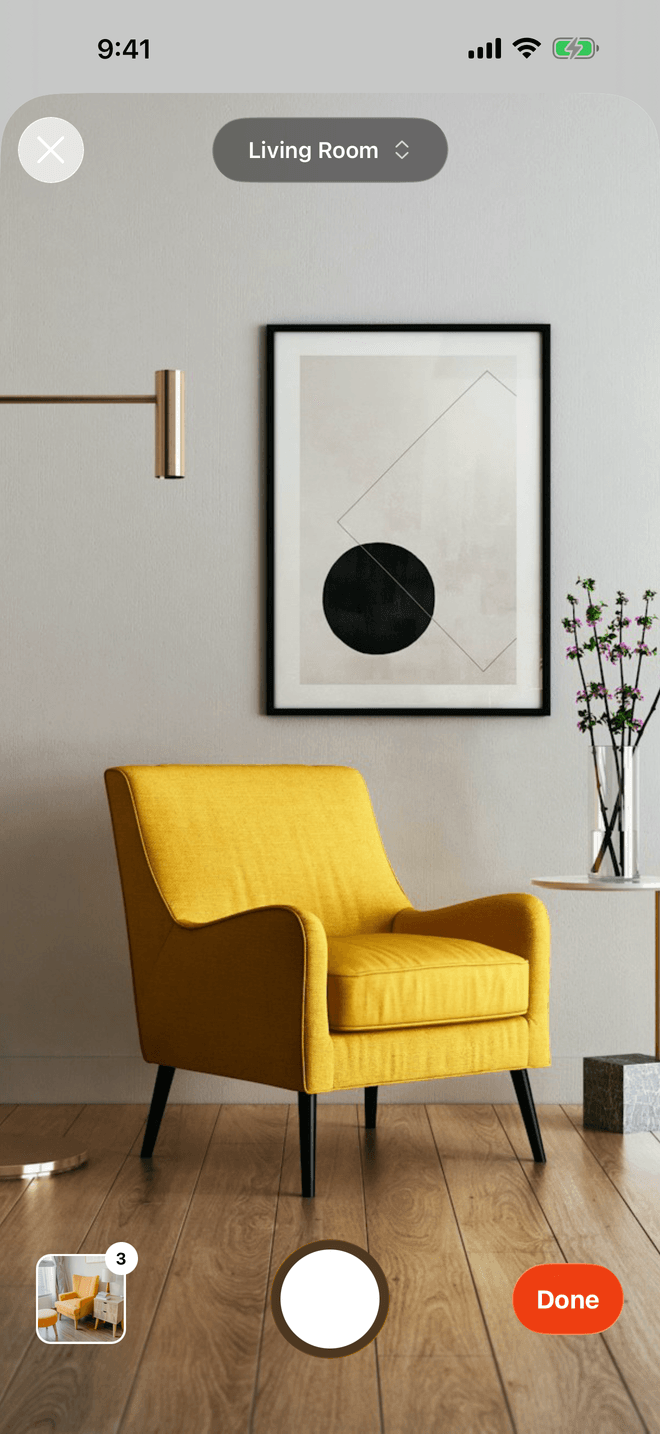
Capture a whole room in minutes
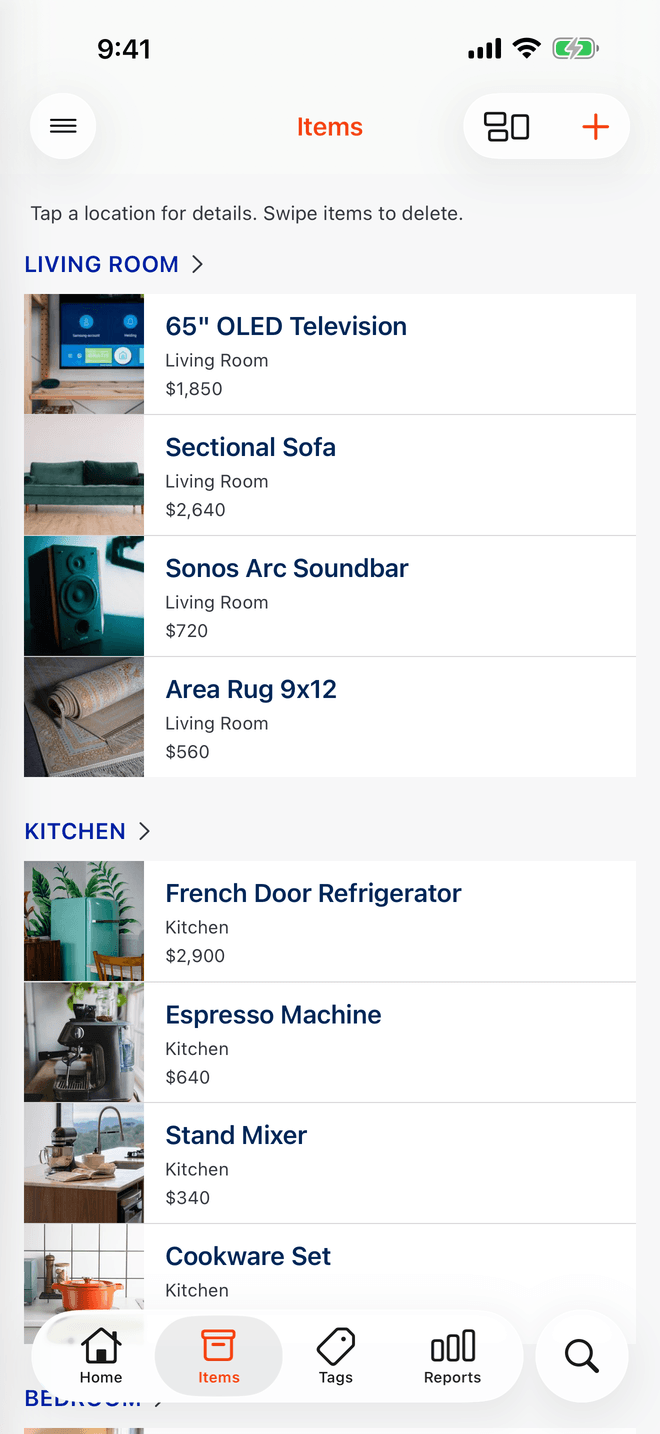
Every room, every item, in one list
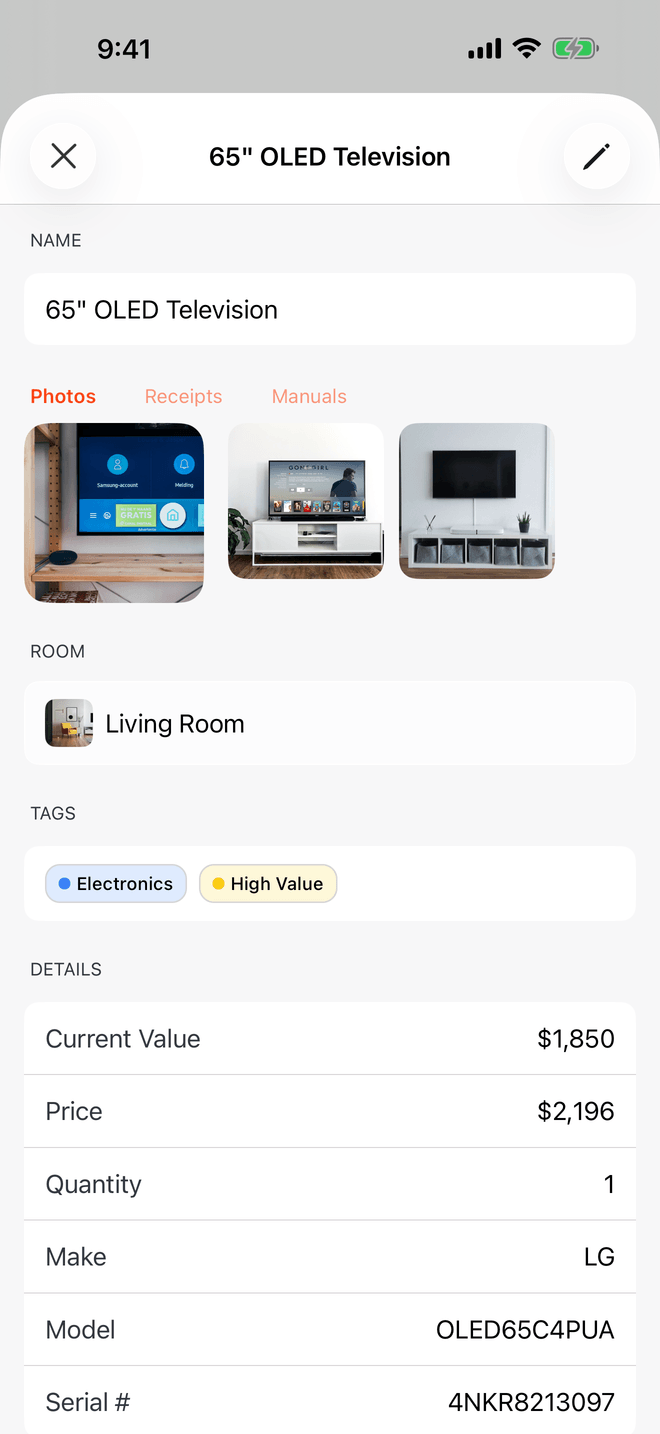
Photos, receipts, and serials in one place
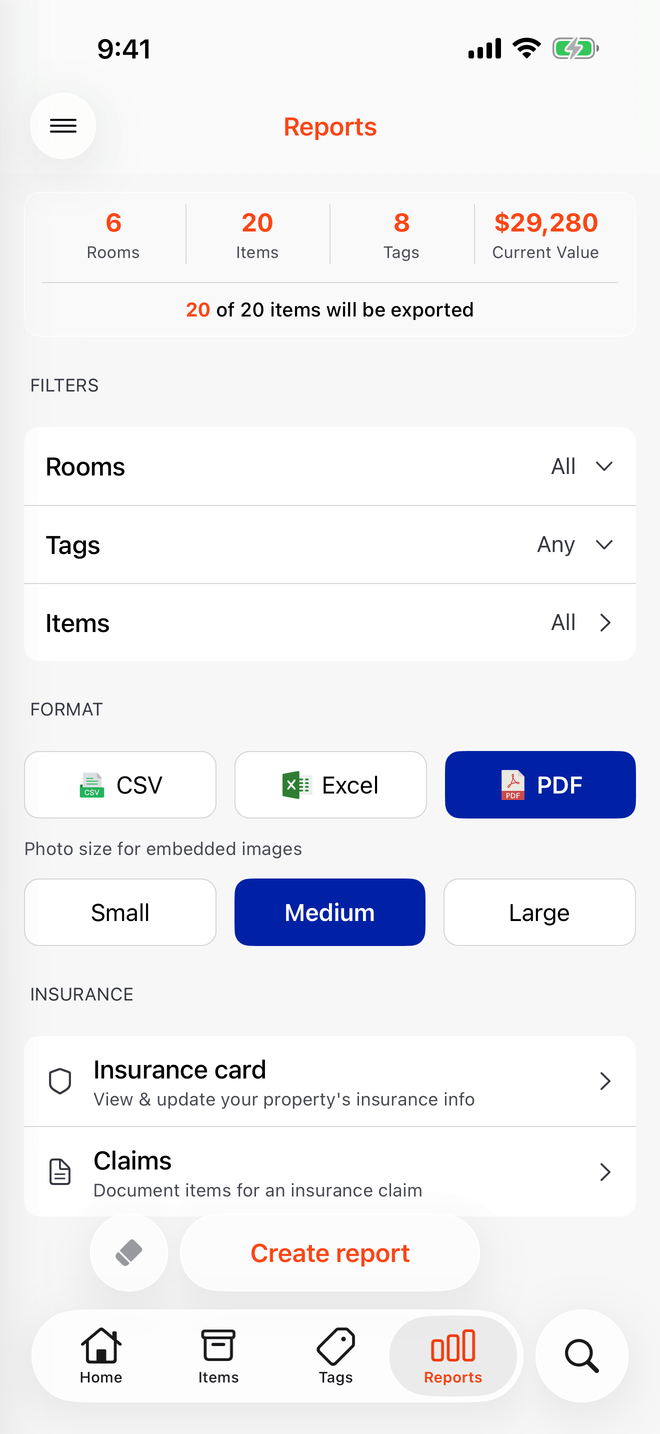
Share a report your adjuster can use


Your inventory stays on your phone
Itemized Home has no backend. Nothing syncs to a server, there is no account to create, and nobody here can see your home, your belongings, or your policy numbers. There is no privacy setting to switch on, because there is nowhere for any of it to go.
No account, no sign-up
Open the app and start. There is no email to hand over and no password to manage.
Stored on your device
Items, photos, receipts, and insurance details are written to your phone and stay there.
Works with no signal
Cell service is usually the first thing to go after a storm. Your inventory does not need it.
The full detail, including the two things that do leave your device, is in our privacy policy.
Common questions
Is my inventory uploaded anywhere?
No. Itemized Home has no backend and no cloud sync. Every item, photo, receipt, and insurance detail is stored on your device. We cannot see any of it.
Do I need an account?
No. There is no sign-up, no email, and no password. Install the app and start with your first room.
What is a Proof of Loss?
It is the sworn statement an insurer asks for after a loss, listing what was damaged or destroyed and what it was worth. Itemized Home builds a draft from the items you already catalogued, so you are not reconstructing it from memory after a fire or a storm.
Is the Proof of Loss valid in my state?
The template follows the Florida sworn statement format and includes the fraud notice Florida requires. Requirements vary by state and by insurer, and the document is a draft you prepare and review yourself rather than legal advice. Confirm the format with your adjuster or attorney before filing.
Does it work offline?
Yes, completely. The core app makes no network calls at all, so it works the same in the days after a storm when cell service is out.
What happens if I lose my phone?
Because the inventory is stored only on your device, it goes with the phone. Back up your device to iCloud or a computer so your inventory is part of that backup, and export a PDF or Excel copy of your inventory somewhere safe. Cloud backup inside the app is on our roadmap.
Is there an Android version?
Not yet. Itemized Home is iPhone and iPad only for now. We would like to build an Android version, but we cannot promise a date.
What does it cost?
Itemized Home is free. There is no subscription, no in-app purchase, and no paywalled feature.

Start with one room
You do not have to do the whole house today. An afternoon of photos now beats trying to remember it all later.
For iPhone and iPad